

Documentation for Python Developers
You want to use GraalPy instead of the standard Python from python.org.
Install GraalPy on your machine and use it like any Python interpreter. You get better performance, the ability to compile to native binaries, and access to the GraalVM ecosystem.
Version Compatibility
The following table shows which Python versions are supported by each GraalPy release:
| GraalPy Version | Python Version | GraalVM Platform |
|---|---|---|
| 25.x | Python 3.12.8 | Oracle GraalVM 25.x, GraalVM Community Edition 25.x |
| 23.x | Python 3.10.8 | Oracle GraalVM for JDK 21.x, Oracle GraalVM for JDK 17.x |
| 22.x | Python 3.8.5 | GraalVM Enterprise Edition 21.3.x |
Platform Support
GraalPy is mostly written in Java and Python, but the Python package ecosystem is rich in native packages that need platform specific support via native libraries that expose platform-specific APIs. The main operating system is Oracle Linux, the CPU architectures are AMD64 and ARM, and the primary JDK is Oracle GraalVM. Linux is recommended for getting started with GraalPy. Windows and macOS with GraalVM JDK are less well tested, and outside of those combinations only basic test coverage is provided. As macOS and other platforms are not prioritized, some GraalPy features may not work on these platforms. See Test Tiers for a detailed breakdown.
These guides cover everything you need to know:
Using GraalPy as a Standalone Python Runtime
GraalPy can be used as a standalone Python runtime, providing a drop-in replacement for CPython. This guide covers installation, basic usage, and deployment options for standalone GraalPy applications.
Choosing a Distribution: For detailed information about GraalPy distributions and runtime options, see Python Runtime.
Installation
Note: There may be a delay between GraalPy release and its availability on Pyenv.
Linux (Recommended Platform)
The easiest way to install GraalPy on Linux is to use Pyenv (the Python version manager):
# Update pyenv to include latest GraalPy versions (if needed)
pyenv update

# Install GraalPy 25.0.2
pyenv install graalpy-25.0.2

# Use GraalPy for the current shell session
pyenv shell graalpy-25.0.2
Manual Installation (Linux)
-
Download the appropriate binary from GitHub releases:
- AMD64:
graalpy-XX.Y.Z-linux-amd64.tar.gz - ARM64:
graalpy-XX.Y.Z-linux-aarch64.tar.gz
- AMD64:
-
Extract and add it to your
PATHenvironment variable:tar -xzf graalpy-25.0.2-linux-amd64.tar.gz export PATH="$PWD/graalpy-25.0.2-linux-amd64/bin:$PATH"
macOS
Using Pyenv (recommended):
# Install GraalPy 25.0.2
pyenv install graalpy-25.0.2

# Use GraalPy for the current shell session
pyenv shell graalpy-25.0.2
Manual Installation (macOS)
-
Download the binary from GitHub releases.
-
Remove quarantine attribute:
sudo xattr -r -d com.apple.quarantine /path/to/graalpy # For example: sudo xattr -r -d com.apple.quarantine ~/.pyenv/versions/graalpy-25.0.2 -
Extract and add it to your
PATHenvironment variable:tar -xzf graalpy-25.0.2-macos-aarch64.tar.gz export PATH="$PWD/graalpy-25.0.2-macos-aarch64/bin:$PATH"
Windows
Warning: The Windows distribution has more limitations than Linux or macOS. Not all features and packages may be available.
-
Download the binary from GitHub releases.
-
Extract and add it to your
PATHenvironment variable:# Extract the file and update your PATH environment variable # to include the graalpy-XX.Y.Z-windows-amd64/bin directory tar -xzf graalpy-25.0.2-windows-amd64.tar.gz $env:PATH = "$PWD\graalpy-25.0.2-windows-amd64\bin;$env:PATH"
Known Windows Limitations
- JLine treats Windows as a dumb terminal (no autocomplete, limited REPL editing)
- Interactive
help()in REPL doesn’t work - Virtual environment issues:
graalpy.cmdandgraalpy.exeare broken insidevenvpip.execannot be used directly- Use
myvenv/Scripts/python.exe -m pip --no-cache-dir install <pkg> - Only pure Python binary wheels supported
- PowerShell works better than CMD
Using Virtual Environments
The recommended way to use GraalPy is with venv virtual environments:
Creating a Virtual Environment
# Create a virtual environment
graalpy -m venv ~/.virtualenvs/graalpy-25.0.2

# Activate the environment
source ~/.virtualenvs/graalpy-25.0.2/bin/activate
Installing Packages
Once in a virtual environment, you can use pip to install packages:
# Install a package
pip install requests

# Install with requirements file
pip install -r requirements.txt
Note: GraalPy’s
pipimplementation may choose different package versions to ensure better compatibility.
To deactivate the virtual environment:
# Return to your normal shell environment
deactivate
Running Python Code
Once installed, you can use GraalPy like any other Python interpreter:
# Interactive REPL
graalpy

# Run a Python script
graalpy myscript.py

# Run a module
graalpy -m mymodule

# Execute inline code
graalpy -c "print('Hello from GraalPy!')"
Platform Support
Linux is the recommended platform for GraalPy. The main testing focus is:
- Operating System: Oracle Linux
- CPU Architectures: AMD64 and ARM64
- Primary JDK: Oracle GraalVM
Windows and macOS with GraalVM JDK have less comprehensive testing. Some GraalPy features may not work optimally on these platforms.
See Test Tiers for a detailed breakdown of platform support.
GraalPy Runtime Guide
Quick Start: For installation and basic usage, see Standalone Getting Started.
Choosing a GraalPy Distribution
GraalPy is available in multiple distributions:
Distribution Options
- GraalPy built on Oracle GraalVM - Provides the best experience with additional optimizations, significantly faster performance and better memory efficiency. Licensed under the GraalVM Free Terms and Conditions (GFTC), which permits use by any user including commercial and production use. Redistribution is permitted as long as it is not for a fee.
- GraalPy Community - Built on top of GraalVM Community Edition, fully open-source.
Runtime Options
Two language runtime options are available for both distributions:
- Native (recommended for standalone use)
- GraalPy is compiled ahead-of-time to a native executable
- You do not need a JVM to run GraalPy and it is compact in size
- Faster startup time
- Faster time to reach peak performance
- JVM
- You can easily exploit Java interoperability
- Peak performance may be higher than the native option
- Slower startup time
Distribution Identification
The GraalPy runtimes are identified using the pattern graalpy(-community)(-jvm)-<version>-<os>-<arch>:
| Distribution | Native | JVM |
|---|---|---|
| Oracle | graalpy-<version>-<os>-<arch> |
graalpy-jvm-<version>-<os>-<arch> |
| Community | graalpy-community-<version>-<os>-<arch> |
graalpy-community-jvm-<version>-<os>-<arch> |
Runtime Comparison
| Runtime | Native (default) | JVM |
|---|---|---|
| Time to start | faster | slower |
| Time to reach peak performance | faster | slower |
| Peak performance (also considering GC) | good | best |
| Java interoperability | needs configuration | works |
GraalPy Capabilities
GraalPy provides a Python 3.12 compliant runtime. A primary goal is to support PyTorch, SciPy, and their constituent libraries, as well as to work with other data science and machine learning libraries from the rich Python ecosystem. The GraalPy runtime is distributed as an ahead-of-time compiled native executable, compact in size.
GraalPy provides the following capabilities:
- CPython-compatible distribution. This is the most compatible option to test Python code on GraalPy, since it most closely resembles the structure of CPython distributions.
- Unique deployment mode for Python applications. Compile a Python application on GraalPy to a single native binary that embeds all needed resources.
- Access to GraalVM’s language ecosystems and tools. GraalPy can run many standard Python tools as well as tools from the GraalVM ecosystem.
Installing GraalPy
NOTE: There will be a delay between GraalPy release and its availability on Pyenv.
Linux
The easiest way to install GraalPy on Linux is to use Pyenv (the Python version manager). To install version 25.0.2 using Pyenv, run the following commands:
pyenv install graalpy-25.0.2
pyenv shell graalpy-25.0.2
Before running
pyenv install, you may need to updatepyenvto include the latest GraalPy versions.
Alternatively, you can download a compressed GraalPy installation file from GitHub releases.
- Find the download that matches the pattern graalpy-XX.Y.Z-linux-amd64.tar.gz or graalpy-XX.Y.Z-linux-aarch64.tar.gz (depending on your platform) and download.
- Uncompress the file and update your
PATHenvironment variable to include to the graalpy-XX.Y.Z-linux-amd64/bin (or graalpy-XX.Y.Z-linux-aarch64/bin) directory.
macOS
The easiest way to install GraalPy on macOS is to use Pyenv (the Python version manager). To install version 25.0.2 using Pyenv, run the following commands:
pyenv install graalpy-25.0.2
pyenv shell graalpy-25.0.2
Before running
pyenv install, you may need to updatepyenvto include the latest GraalPy versions.
Alternatively, you can download a compressed GraalPy installation file from GitHub releases.
- Find the download that matches the pattern graalpy-XX.Y.Z-macos-aarch64.tar.gz and download.
- Remove the quarantine attribute.
sudo xattr -r -d com.apple.quarantine /path/to/graalpyFor example:
sudo xattr -r -d com.apple.quarantine ~/.pyenv/versions/graalpy-25.0.2 - Uncompress the file and update your
PATHenvironment variable to include to the graalpy-XX.Y.Z-macos-aarch64/bin directory.
Windows
- Find and download a compressed GraalPy installation file from GitHub releases that matches the pattern graalpy-XX.Y.Z-windows-amd64.tar.gz.
- Uncompress the file and update your
PATHvariable to include to the graalpy-XX.Y.Z-windows-amd64/bin directory.
Windows Limitations
The Windows distribution of GraalPy has more limitations than its Linux or macOS counterpart, so not all features and packages may be available.
It has the following known issues:
- JLine treats Windows as a dumb terminal, with no autocomplete and limited editing capabilities in the REPL
- Interactive
help()in the REPL does not work - Inside a virtual environment:
- graalpy.cmd and graalpy.exe are broken
- pip.exe cannot be used directly
piphas trouble with cache file loading, use--no-cache-dir- Only pure Python binary wheels can be installed, no native extensions or source builds
- To install a package, use
myvenv/Scripts/python.exe -m pip --no-cache-dir install <pkg>
- Running from PowerShell works better than running from CMD, various scripts will fail on the latter
Installing Packages
The best way of using GraalPy is from a venv virtual environment. This generates wrapper scripts and makes the implementation usable from a shell as the standard Python interpreter.
- Create a virtual environment with GraalPy by running the following command:
graalpy -m venv <venv-dir>For example:
graalpy -m venv ~/.virtualenvs/graalpy-25.0.2 - Activate the environment in your shell session:
source <venv-dir>/bin/activateFor example:
source ~/.virtualenvs/graalpy-25.0.2/bin/activate
Multiple executables are available in the virtual environment, including: python, python3, and graalpy.
Note: To deactivate the Python environment (and return to your shell), run
deactivate.
The pip package installer is available when using a virtual environment.
The GraalPy implementation of pip may choose package versions other than the latest in cases where it ships patches to make these work better.
Python Standalone Applications
GraalPy enables you to package your Python applications or libraries into native executables or JAR files with no external dependencies. This means users can run your application without installing Python or any packages.
GraalPy uses the Truffle framework to bundle your Python code, dependencies, and the Python runtime into standalone executables. Truffle’s filesystem virtualization allows everything to work from a single file, though packages with native C extensions may have limitations.
GraalPy includes a module named standalone to create a Python binary for Linux, macOS, and Windows.
The module bundles all your application’s resources into a single file.
Prerequisite: GraalPy 23.1.0 or later. Download here or verify your version with
graalpy --version.
Running Python Standalone Applications
To create an native executable from a Python file with its dependencies, use this command:
graalpy -m standalone native \
      --module my_script.py \
      --output my_binary \
      --venv my_env
Where:
--module my_script.pystates the main Python file that contains your application’s entry point--output my_binarystates the name for your standalone executable (no file extension needed)--venv my_envstates the path to virtual environment with installed packages (you can omit this if there are no dependencies)
This produces a native my_binary file which includes your Python code, the GraalPy runtime, and the Python standard library in a single, self-contained executable.
Use graalpy -m standalone native --help for further options.
Security Considerations of Python Standalone Applications
Standalone executables do not protect your source code. Your Python code becomes bytecode, and bytecode can be easily decompiled back to readable Python code.
Native Extensions Support
CPython provides a native extensions API for writing Python extensions in C/C++.
GraalPy provides experimental support for this API, which allows many packages like NumPy and PyTorch to work well for many use cases.
The support extends only to the API, not the binary interface (ABI), so extensions built for CPython are not binary compatible with GraalPy.
Packages that use the native API must be built and installed with GraalPy, and the prebuilt wheels for CPython from pypi.org cannot be used.
For best results, it is crucial that you only use the pip command that comes preinstalled in GraalPy virtual environments to install packages.
The version of pip shipped with GraalPy applies additional patches to packages upon installation to fix known compatibility issues and it is preconfigured to use an additional repository from graalvm.org where we publish a selection of prebuilt wheels for GraalPy.
Please do not update pip or use alternative tools such as uv.
Embedding limitations
Python native extensions run by default as native binaries, with full access to the underlying system. This has a few implications:
- Native code is entirely unrestricted and can circumvent any security protections Truffle or the JVM may provide.
- Native data structures are not subject to the Java GC and the combination of them with Java data structures may lead to increased memory pressure or memory leaks.
- Native libraries generally cannot be loaded multiple times into the same process, and they may contain global state that cannot be safely reset.
Full Native Access
The Context API allows to set options such as allowIO, allowHostAccess, allowThreads and more on the created contexts.
To use Python native extensions on GraalPy, the allowNativeAccess option must be set to true, but this opens the door to full native access.
This means that while Python code may be denied access to the host file system, thread- or subprocess creation, and more, the native extension is under no such restriction.
Memory Management
Python C extensions, like the CPython reference implementation, use reference counting for memory management. This is fundamentally incompatible with JVM GCs.
Java objects may end up being referenced from native data structures which the JVM cannot trace, so to avoid crashing, GraalPy keeps such Java objects strongly referenced. To avoid memory leaks, GraalPy implements a cycle detector that regularly traces references between Java objects and native objects that have crossed between the two worlds and cleans up strong references that are no longer needed.
On the other side, reference-counted native extension objects may end up being referenced from Java objects, and in this case GraalPy bumps their reference count to make them unreclaimable.
Any such references to native extension objects are registered with a java.lang.ref.WeakReference and when the JVM GC has collected the owning Java object, the reference count of the native object is reduced again.
Both of these mechanisms together mean there is additional delay between objects becoming unreachable and their memory being reclaimed when compared to the CPython implementation.
This can manifest in increased memory usage when running C extensions.
You can tweak the Context options python.BackgroundGCTaskInterval, python.BackgroundGCTaskThreshold, and BackgroundGCTaskMinimum to mitigate this.
They control the minimum interval between cycle detections, how much RSS memory must have increased since the last time to trigger the cycle detector, and the absolute minimum RSS under which no cycle detection should be done.
You can also manually trigger the detector with the Python gc.collect() call.
Multi-Context and Native Libraries
Using C extensions in multiple contexts is only possible on Linux for now, and many C extensions still have issues in this mode.
You should test your applications thoroughly if you want to use this feature.
There are many possibilities for native code to sidestep the library isolation through other process-wide global state, corrupting the state and leading to incorrect results or crashing.
The implementation also relies on venv to work, even if you are not using external packages.
To support creating multiple GraalPy contexts that access native modules within the same JVM or Native Image, we need to isolate them from each other.
The current strategy for this is to copy the libraries and modify them such that the dynamic library loader of the operating system will isolate them for us.
To do this, all GraalPy contexts in the same process (not just those in the same engine!) must set the python.IsolateNativeModules option to true.
You should test your applications thoroughly if you want to use this feature, as there are many possiblities for native code to sidestep the library isolation through other process-wide global state.
For more details on this, see our implementation details.
Python Performance
Execution Performance
GraalPy uses the state-of-the-art just-in-time (JIT) compiler of GraalVM.
When JIT compiled, GraalPy runs Python code ~4x faster than CPython on the official Python Performance Benchmark Suite.
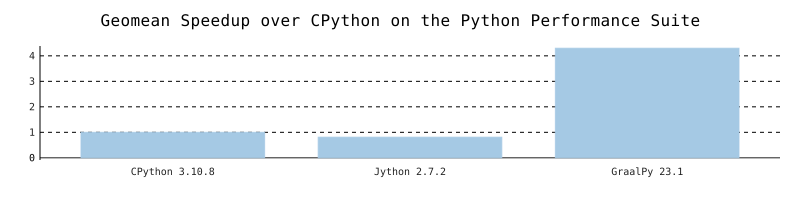
These benchmarks can be run by installing the pyperformance package and calling pyperformance run on each of CPython and GraalPy.
To get the Jython numbers we adapted the harness and benchmarks because of missing Python 3 support in Jython.
The speedup was then calculated by taking the pair-wise intersection of working benchmarks and calculating the geomean.
Without a JIT compiler, GraalPy currently executes pure Python code around ~4x slower than CPython. This means that very short running scripts or scripts running without the Graal compiler on Oracle JDK or OpenJDK are expected to be slower.
Many Python packages from the machine learning or data science ecosystems contain C extension code. This code benefits little from GraalPy’s JIT compilation and suffers from having to emulate CPython implementation details on GraalPy. When many C extensions are involved, performance can vary a lot depending on the specific interactions of native and Python code.
Code Loading Performance and Footprint
It takes time to parse Python code so when using GraalPy to embed another language in Python, observe the general advice for embedding Graal languages related to code caching. Furthermore, some Python libraries require loading a large amount of code on startup before they can do any work. Due to the design of the Python language, incremental parsing is not possible and for some scripts, the parser may represent a significant fraction of runtime and memory. To mitigate this, GraalPy can cache the bytecode generated during parsing in .pyc files, if appropriate file system access is configured.
Creating and Managing .pyc Files
GraalPy automatically creates a .pyc file when there is an invalid or absent .pyc file that matches a corresponding .py file.
When GraalPy imports a Python source file (module) during an execution for the first time, it automatically creates a corresponding .pyc file. If GraalPy imports the same module again, then it uses the existing .pyc file. That means that there are no .pyc files for source files that were not yet executed (imported). GraalPy creates .pyc files entirely through the FileSystem API, so that a Java application with embedded Python code can manage file system access.
Note: GraalPy never deletes a .pyc file.
Every time GraalPy subsequently executes a script, it reuses the existing .pyc file, or creates a new one.
GraalPy recreates a .pyc file if the timestamp or hashcode of the original source file is changed.
GraalPy generates the hashcode based only on the Python source file by calling source.hashCode(), which is the JDK hash code over the array of source file bytes, calculated with java.util.Arrays.hashCode(byte[]).
GraalPy also recreates .pyc files if a magic number in the Python parser is changed. The magic number is hard-coded in the source of Python and can not be changed by the user (unless of course that user has access to the bytecode of Python).
The developers of GraalPy change the magic number when the bytecode format changes.
This is an implementation detail, so the magic number does not have to correspond to the version of GraalPy (as in CPython).
The magic number of pyc is a function of the actual Python runtime Java code that is running.
Changes to the magic number are communicated in the release notes so that developers or system administrators can delete old .pyc files when upgrading.
Note that if you use .pyc files, you must allow write-access to GraalPy at least when switching versions or modifying the original source code file. Otherwise, the regeneration of source code files will fail and every import will have the overhead of accessing each old .pyc file, parsing the code, serializing it, and trying (and failing) to write out a new .pyc file.
GraalPy creates the following directory structure for .pyc files:
top_directory/
  __pycache__/
    sourceA.graalpy.pyc
    sourceB.graalpy.pyc
  sourceA.py
  sourceB.py
  sub_directory/
    __pycache__/
      sourceX.graalpy.pyc
    sourceX.py
By default, GraalPy creates the __pycache__ directory on the same directory level as a source code file and in this directory all .pyc files from the same directory are stored. This directory may store .pyc files created with different versions of Python (including, for example, CPython), so the user may see files ending in .cpython3-6.pyc, for example.
.pyc files are largely managed automatically by GraalPy in a manner compatible with CPython. GraalPy provides options similar to CPython to specify the location of t_.pyc_ files, and if they should be written at all, and both of these options can be changed by guest code.
The creation of .pyc files can be controlled in the same way as CPython:
- The GraalPy launcher (
graalpy) reads thePYTHONDONTWRITEBYTECODEenvironment variable. If this is set to a non-empty string, Python will not try to create a .pyc file when importing a module. - The launcher command line option
-B, if given, has the same effect as the above. - Guest language code can change the attribute
dont_write_bytecodeof thesysbuilt-in module at runtime to change the behavior for subsequent imports. - The GraalPy launcher reads the
PYTHONPYCACHEPREFIXenvironment variable. If set, it creates the __pycache__ directory at the path specified by the prefix, and creates a mirror of the directory structure of the source tree on-demand to store the .pyc files. - A guest language code can change the attribute
pycache_prefixof thesysmodule at runtime to change the location for subsequent imports.
Because the developer cannot use environment variables or CPython options to communicate these options to GraalPy, these options are made available as language options:
python.DontWriteBytecodeFlag- equivalent to-BorPYTHONDONTWRITEBYTECODEpython.PyCachePrefix- equivalent toPYTHONPYCACHEPREFIX
Note that a Python context will not enable writing .pyc files by default. The GraalPy launcher enables it by default, but if this is desired in the embedding use case, care should be taken to ensure that the __pycache__ location is properly managed and the files in that location are secured against manipulation in the same way as the source code files (.py) from which they were derived.
Note also that to upgrade the application sources to Oracle GraalPy, old .pyc files must be removed by the developer as required.
Security Considerations
GraalPy performs all file operations (obtaining the data, timestamps, and writing .pyc files) via the FileSystem API.
Developers can modify all of these operations by means of custom (for example, read-only) FileSystem implementations.
The developer can also effectively disable the creation of .pyc files by disabling I/O permissions for GraalPy.
If .pyc files are not readable, their location is not writable. If the .pyc files’ serialization data or magic numbers are corrupted in any way, the deserialization fails and GraalPy parses the .py source code file again. This comes with a minor performance hit only for the parsing of modules, which should not be significant for most applications (provided the application performs actual work in addition to loading Python code).
Tooling Support for Python
Debugging
GraalPy provides the standard Python debugger pdb.
Refer to the official PDB documentation for usage.
The built-in breakpoint() function uses pdb by default.
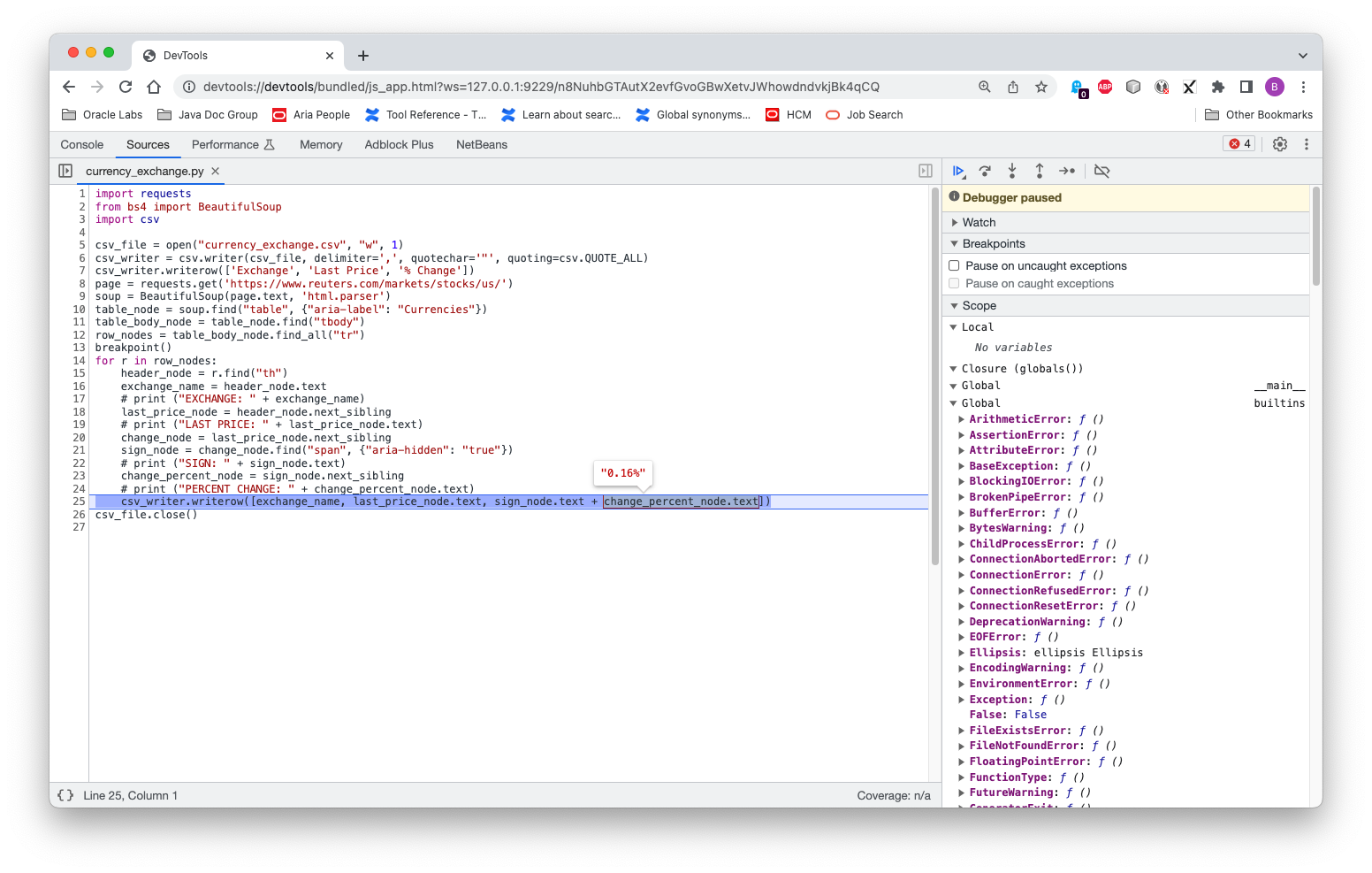
GraalPy also comes with built-in support for graphical debugging through Chrome’s developer tools.
To enable the debugger, pass the --inspect command-line option.
You can inspect variables, set watch expressions, interactively evaluate code snippets, and so on.
-
Run a Python script using the command-line option
--inspect:graalpy --inspect my_script.py -
You should see output similar to:
Debugger listening on ws://127.0.0.1:9229/VrhCaY7wR5tIqy2zLsdFr3f7ixY3QB6kVQ0S54_SOMo For help, see: https://www.graalvm.org/tools/chrome-debugger E.g. in Chrome open: devtools://devtools/bundled/js_app.html?ws=127.0.0.1:9229/VrhCaY7wR5tIqy2zLsdFr3f7ixY3QB6kVQ0S54_SOMo -
Open Chrome browser and enter the provided URL.
You can now:
- Inspect the call stack and variables
- Set breakpoints and step through code
- Evaluate expressions in the console
- View variable values in tooltips
For example:
Profiling
GraalPy provides three main profiling capabilities: CPU sampling, CPU tracing, and memory tracing. Each tool is described below.
For complete options, use: graalpy --help:tools
CPU Sampler
Use the --cpusampler command-line option to take a CPU sample.
For example:
graalpy --cpusampler my_script.py
You should see output similar to:
CPU Sampler Output (Click to expand)
--------------------------------------------------------------------------------------------------------------------------------------------------------------
Sampling Histogram. Recorded 564 samples with period 10ms. Missed 235 samples.
  Self Time: Time spent on the top of the stack.
  Total Time: Time spent somewhere on the stack.
--------------------------------------------------------------------------------------------------------------------------------------------------------------
Thread[main,5,main]
 Name                                                                       ||             Total Time    ||              Self Time    || Location
--------------------------------------------------------------------------------------------------------------------------------------------------------------
 parse_starttag                                                             ||             1090ms  19.3% ||              570ms  10.1% || <install-dir>/lib/python3.10/html/parser.py~300-347:11658-13539
 match                                                                      ||              190ms   3.4% ||              190ms   3.4% || <venv-dir>/lib/python3.10/site-packages/soupsieve/css_parser.py~320-323:9862-10026
 _replace_cdata_list_attribute_values                                       ||              190ms   3.4% ||              190ms   3.4% || <venv-dir>/lib/python3.10/site-packages/bs4/builder/__init__.py~295-331:11245-13031
 goahead                                                                    ||             1430ms  25.4% ||              150ms   2.7% || <install-dir>/lib/python3.10/html/parser.py~133-250:4711-9678
 check_for_whole_start_tag                                                  ||              130ms   2.3% ||              130ms   2.3% || <install-dir>/lib/python3.10/html/parser.py~351-382:13647-14758
 <module>                                                                   ||              800ms  14.2% ||              130ms   2.3% || <venv-dir>/lib/python3.10/site-packages/soupsieve/css_parser.py~1-1296:0-47061
 ...
--------------------------------------------------------------------------------------------------------------------------------------------------------------
CPU Tracer
Use the --cputracer --cputracer.TraceStatements command-line options to trace CPU usage.
For example:
graalpy --cputracer --cputracer.TraceStatements my_script.py
You should see output similar to:
CPU Tracer Output (Click to expand)
--------------------------------------------------------------------------------------------------------------------
Tracing Histogram. Counted a total of 1135 element executions.
  Total Count: Number of times the element was executed and percentage of total executions.
  Interpreted Count: Number of times the element was interpreted and percentage of total executions of this element.
  Compiled Count: Number of times the compiled element was executed and percentage of total executions of this element.
--------------------------------------------------------------------------------------------------------------------
 Name                                |          Total Count |    Interpreted Count |       Compiled Count | Location
--------------------------------------------------------------------------------------------------------------------
 get_newfunc_typeid                  |           110   9.7% |           110 100.0% |             0   0.0% | capi.c~596:0
 PyTruffle_PopulateType              |           110   9.7% |           110 100.0% |             0   0.0% | capi.c~721:0
 PyTruffle_AllocMemory               |            86   7.6% |            86 100.0% |             0   0.0% | obmalloc.c~77:0
 PyTruffle_AllocateType              |            66   5.8% |            66 100.0% |             0   0.0% | capi.c~874:0
 PyMem_RawMalloc                     |            66   5.8% |            66 100.0% |             0   0.0% | obmalloc.c~170:0
 initialize_type_structure           |            50   4.4% |            50 100.0% |             0   0.0% | capi.c~181:0
 _Py_TYPE                            |            45   4.0% |            45 100.0% |             0   0.0% | object_shared.c~55:0
 PyType_GetFlags                     |            41   3.6% |            41 100.0% |             0   0.0% | typeobject_shared.c~44:0
 get_tp_name                         |            37   3.3% |            37 100.0% |             0   0.0% | capi.c~507:0
 ...
--------------------------------------------------------------------------------------------------------------------
Memory Tracer
Use the --memtracer --memtracer.TraceStatements command-line options to trace memory usage.
For example:
graalpy --experimental-options --memtracer --memtracer.TraceStatements my_script.py
You should see output similar to:
Memory Tracer Output (Click to expand)
----------------------------------------------------------------------------
 Location Histogram with Allocation Counts. Recorded a total of 565 allocations.
   Total Count: Number of allocations during the execution of this element.
   Self Count: Number of allocations in this element alone (excluding sub calls).
----------------------------------------------------------------------------
 Name                         |      Self Count |     Total Count | Location
----------------------------------------------------------------------------
 PyTruffle_PopulateType       |      440  77.9% |      440  77.9% | capi.c~721:0
 PyType_Ready                 |       61  10.8% |       68  12.0% | typeobject.c~463:0
 _PyObject_MakeTpCall         |       20   3.5% |       24   4.2% | object.c~155:0
 PyUnicode_FromString         |       11   1.9% |       11   1.9% | capi.c~2161:0
 PyErr_NewException           |       11   1.9% |       11   1.9% | capi.c~1537:0
 _PyUnicode_AsASCIIString     |        6   1.1% |        6   1.1% | capi.c~2281:0
 PyDict_New                   |        4   0.7% |        4   0.7% | capi.c~1505:0
 PyTuple_New                  |        4   0.7% |        4   0.7% | capi.c~2097:0
 PyUnicode_FromStringAndSize  |        3   0.5% |        3   0.5% | unicodeobject.c~171:0
 ...
----------------------------------------------------------------------------
Coverage
GraalPy provides its own implementation of the Coverage.py tool to measure code coverage of Python programs.
Enable it using the --coverage command-line option, as shown below.
(For details, use the graalpy --help:tools command.)
graalpy --coverage my_script.py
You should see output similar to:
Coverage Output (Click to expand)
------------------------------------------------------------------------------------------------------------------------------------------------
Code coverage histogram.
  Shows what percent of each element was covered during execution
------------------------------------------------------------------------------------------------------------------------------------------------
 Path                                                                          |  Statements |    Lines |    Roots
------------------------------------------------------------------------------------------------------------------------------------------------
 <venv-dir>/lib/python3.10/site-packages/_distutils_hack/__init__.py           |       0.00% |    0.00% |    0.00%
 <venv-dir>/lib/python3.10/site-packages/bs4/__init__.py                       |      56.10% |   56.14% |   55.26%
 <venv-dir>/lib/python3.10/site-packages/bs4/builder/__init__.py               |      79.12% |   78.84% |   50.00%
 <venv-dir>/lib/python3.10/site-packages/bs4/builder/_html5lib.py              |       2.41% |    2.46% |    2.38%
 <venv-dir>/lib/python3.10/site-packages/bs4/builder/_htmlparser.py            |      69.08% |   68.67% |   83.33%
 <venv-dir>/lib/python3.10/site-packages/bs4/builder/_lxml.py                  |       3.72% |    3.78% |    4.00%
 <venv-dir>/lib/python3.10/site-packages/bs4/css.py                            |      32.73% |   31.48% |   15.38%
 <venv-dir>/lib/python3.10/site-packages/bs4/dammit.py                         |      65.46% |   65.29% |   24.14%
 <venv-dir>/lib/python3.10/site-packages/bs4/element.py                        |      44.15% |   43.13% |   31.08%
 <venv-dir>/lib/python3.10/site-packages/bs4/formatter.py                      |      73.49% |   74.36% |   66.67%
 <venv-dir>/lib/python3.10/site-packages/certifi/__init__.py                   |     100.00% |  100.00% |  100.00%
 <venv-dir>/lib/python3.10/site-packages/certifi/core.py                       |      33.33% |   33.33% |   25.00%
 <venv-dir>/lib/python3.10/site-packages/charset_normalizer/__init__.py        |     100.00% |  100.00% |  100.00%
 <venv-dir>/lib/python3.10/site-packages/charset_normalizer/api.py             |      11.87% |   11.94% |   16.67%
 <venv-dir>/lib/python3.10/site-packages/charset_normalizer/assets/__init__.py |     100.00% |  100.00% |  100.00%
 <venv-dir>/lib/python3.10/site-packages/charset_normalizer/cd.py              |      12.81% |   13.54% |    4.35%
 <venv-dir>/lib/python3.10/site-packages/charset_normalizer/constant.py        |     100.00% |  100.00% |  100.00%
 <venv-dir>/lib/python3.10/site-packages/charset_normalizer/legacy.py          |      25.00% |   25.00% |   50.00%
 <venv-dir>/lib/python3.10/site-packages/charset_normalizer/md.py              |      22.05% |   20.37% |   17.24%
 <venv-dir>/lib/python3.10/site-packages/charset_normalizer/models.py          |      38.46% |   38.50% |    9.30%
 <venv-dir>/lib/python3.10/site-packages/charset_normalizer/utils.py           |      26.79% |   26.89% |    3.33%
 <venv-dir>/lib/python3.10/site-packages/charset_normalizer/version.py         |     100.00% |  100.00% |  100.00%
 <venv-dir>/lib/python3.10/site-packages/idna/__init__.py                      |     100.00% |  100.00% |  100.00%
 <install-dir>/lib/python3.10/collections/abc.py                               |     100.00% |  100.00% |  100.00%
 <install-dir>/lib/python3.10/contextlib.py                                    |      40.80% |   37.99% |   31.71%
 <install-dir>/lib/python3.10/copy.py                                          |      36.36% |   36.41% |   21.43%
 <install-dir>/lib/python3.10/copyreg.py                                       |       3.20% |    3.20% |    7.69%
 <install-dir>/lib/python3.10/csv.py                                           |      25.17% |   23.91% |   25.00%
 <install-dir>/lib/python3.10/datetime.py                                      |      30.32% |   30.01% |   14.74%
 <install-dir>/lib/python3.10/email/__init__.py                                |      42.86% |   42.86% |   20.00%
 <install-dir>/lib/python3.10/email/_encoded_words.py                          |      35.11% |   34.44% |   14.29%
 <install-dir>/lib/python3.10/email/_parseaddr.py                              |      12.64% |   12.15% |   10.71%
 <install-dir>/lib/python3.10/email/_policybase.py                             |      55.22% |   54.69% |   39.29%
 <install-dir>/lib/python3.10/email/base64mime.py                              |      35.00% |   35.00% |   20.00%
 <install-dir>/lib/python3.10/typing.py                                        |      49.86% |   48.93% |   34.60%
 <install-dir>/lib/python3.10/urllib/__init__.py                               |     100.00% |  100.00% |  100.00%
 <install-dir>/lib/python3.10/warnings.py                                      |      21.29% |   20.77% |   25.00%
 <install-dir>/lib/python3.10/weakref.py                                       |      37.93% |   36.78% |   23.68%
 <install-dir>/lib/python3.10/zipfile.py                                       |      17.86% |   17.23% |   11.03%
 <src-dir>/my_script.py                                                        |     100.00% |  100.00% |  100.00%
------------------------------------------------------------------------------------------------------------------------------------------------
Trace
The standard Python trace module is also provided.
Note: This works in the same way as CPython.
The programmatic API also works but with limitations: it currently tracks only line counts and called functions, not calls themselves.
For example, running this command:
graalpy -m trace -c -s text_styler.py Welcome to GraalPy!
You should see output similar to:
CPU Tracer Output (Click to expand)
_       __     __                             __
| |     / /__  / /________  ____ ___  ___     / /_____
| | /| / / _ \/ / ___/ __ \/ __ `__ \/ _ \   / __/ __ \
| |/ |/ /  __/ / /__/ /_/ / / / / / /  __/  / /_/ /_/ /
|__/|__/\___/_/\___/\____/_/ /_/ /_/\___/   \__/\____/

   ______                 ______        __
  / ____/________ _____ _/ / __ \__  __/ /
 / / __/ ___/ __ `/ __ `/ / /_/ / / / / /
/ /_/ / /  / /_/ / /_/ / / ____/ /_/ /_/
\____/_/   \__,_/\__,_/_/_/    \__, (_)
                              /____/

lines   cov%   module   (path)
    9   100%   __about__   (<venv-dir>/lib/python3.10/site-packages/pkg_resources/_vendor/packaging/__about__.py)
   51   100%   __future__   (<install-dir>/lib/python3.10/__future__.py)
    1   100%   __init__   (<venv-dir>/lib/python3.10/site-packages/pyfiglet/fonts/__init__.py)
   27   100%   _adapters   (<install-dir>/lib/python3.10/importlib/_adapters.py)
   25   100%   _common   (<install-dir>/lib/python3.10/importlib/_common.py)
   44   100%   _manylinux   (<venv-dir>/lib/python3.10/site-packages/pkg_resources/_vendor/packaging/_manylinux.py)
   20   100%   _musllinux   (<venv-dir>/lib/python3.10/site-packages/pkg_resources/_vendor/packaging/_musllinux.py)
   66   100%   _osx_support   (<install-dir>/lib/python3.10/_osx_support.py)
   43   100%   _parseaddr   (<install-dir>/lib/python3.10/email/_parseaddr.py)
   62   100%   _policybase   (<install-dir>/lib/python3.10/email/_policybase.py)
   20   100%   _structures   (<venv-dir>/lib/python3.10/site-packages/pkg_resources/_vendor/packaging/_structures.py)
  105   100%   abc   (<install-dir>/lib/python3.10/importlib/abc.py)
   18   100%   actions   (<venv-dir>/lib/python3.10/site-packages/pkg_resources/_vendor/pyparsing/actions.py)
   41   100%   appdirs   (<venv-dir>/lib/python3.10/site-packages/pkg_resources/_vendor/appdirs.py)
   59   100%   base64   (<install-dir>/lib/python3.10/base64.py)
   14   100%   base64mime   (<install-dir>/lib/python3.10/email/base64mime.py)
   11   100%   bisect   (<install-dir>/lib/python3.10/bisect.py)
  124   100%   calendar   (<install-dir>/lib/python3.10/calendar.py)
   94   100%   charset   (<install-dir>/lib/python3.10/email/charset.py)
  122   100%   common   (<venv-dir>/lib/python3.10/site-packages/pkg_resources/_vendor/pyparsing/common.py)
   40   100%   context   (<venv-dir>/lib/python3.10/site-packages/pkg_resources/_vendor/jaraco/context.py)
    3   100%   contextlib   (<install-dir>/lib/python3.10/contextlib.py)
   91   100%   copy   (<install-dir>/lib/python3.10/copy.py)
 1497   100%   core   (<venv-dir>/lib/python3.10/site-packages/pkg_resources/_vendor/pyparsing/core.py)
  108   100%   dataclasses   (<install-dir>/lib/python3.10/dataclasses.py)
   31   100%   datetime   (<install-dir>/lib/python3.10/datetime.py)
    9   100%   encoders   (<install-dir>/lib/python3.10/email/encoders.py)
 2493   100%   entities   (<install-dir>/lib/python3.10/html/entities.py)
   58   100%   errors   (<install-dir>/lib/python3.10/email/errors.py)
   49   100%   exceptions   (<venv-dir>/lib/python3.10/site-packages/pkg_resources/_vendor/pyparsing/exceptions.py)
    5   100%   expat   (<install-dir>/lib/python3.10/xml/parsers/expat.py)
   41   100%   feedparser   (<install-dir>/lib/python3.10/email/feedparser.py)
   45   100%   functools   (<venv-dir>/lib/python3.10/site-packages/pkg_resources/_vendor/jaraco/functools.py)
   69   100%   gettext   (<install-dir>/lib/python3.10/gettext.py)
   56   100%   header   (<install-dir>/lib/python3.10/email/header.py)
  162   100%   helpers   (<venv-dir>/lib/python3.10/site-packages/pkg_resources/_vendor/pyparsing/helpers.py)
    1   100%   inspect   (<install-dir>/lib/python3.10/inspect.py)
   47   100%   linecache   (<install-dir>/lib/python3.10/linecache.py)
   95   100%   markers   (<venv-dir>/lib/python3.10/site-packages/pkg_resources/_vendor/packaging/markers.py)
  192   100%   more   (<venv-dir>/lib/python3.10/site-packages/pkg_resources/_vendor/more_itertools/more.py)
  204   100%   optparse   (<install-dir>/lib/python3.10/optparse.py)
   14   100%   os   (<install-dir>/lib/python3.10/os.py)
  167   100%   parse   (<install-dir>/lib/python3.10/urllib/parse.py)
   19   100%   parser   (<install-dir>/lib/python3.10/email/parser.py)
  242   100%   pathlib   (<install-dir>/lib/python3.10/pathlib.py)
   66   100%   pkgutil   (<install-dir>/lib/python3.10/pkgutil.py)
  137   100%   platform   (<install-dir>/lib/python3.10/platform.py)
  102   100%   plistlib   (<install-dir>/lib/python3.10/plistlib.py)
   79   100%   pprint   (<install-dir>/lib/python3.10/pprint.py)
   54   100%   queue   (<install-dir>/lib/python3.10/queue.py)
   21   100%   quopri   (<install-dir>/lib/python3.10/quopri.py)
   32   100%   quoprimime   (<install-dir>/lib/python3.10/email/quoprimime.py)
  101   100%   random   (<install-dir>/lib/python3.10/random.py)
   43   100%   recipes   (<venv-dir>/lib/python3.10/site-packages/pkg_resources/_vendor/more_itertools/recipes.py)
   51   100%   requirements   (<venv-dir>/lib/python3.10/site-packages/pkg_resources/_vendor/packaging/requirements.py)
   46   100%   resources   (<install-dir>/lib/python3.10/importlib/resources.py)
  155   100%   results   (<venv-dir>/lib/python3.10/site-packages/pkg_resources/_vendor/pyparsing/results.py)
   79   100%   selectors   (<install-dir>/lib/python3.10/selectors.py)
   30   100%   signal   (<install-dir>/lib/python3.10/signal.py)
   94   100%   socket   (<install-dir>/lib/python3.10/socket.py)
  143   100%   specifiers   (<venv-dir>/lib/python3.10/site-packages/pkg_resources/_vendor/packaging/specifiers.py)
   50   100%   string   (<install-dir>/lib/python3.10/string.py)
  118   100%   subprocess   (<install-dir>/lib/python3.10/subprocess.py)
   96   100%   sysconfig   (<install-dir>/lib/python3.10/sysconfig.py)
   67   100%   tags   (<venv-dir>/lib/python3.10/site-packages/pkg_resources/_vendor/packaging/tags.py)
  119   100%   tempfile   (<install-dir>/lib/python3.10/tempfile.py)
   35   100%   testing   (<venv-dir>/lib/python3.10/site-packages/pkg_resources/_vendor/pyparsing/testing.py)
    7   100%   text_styler   (<src-dir>/text_styler.py)
   51   100%   textwrap   (<install-dir>/lib/python3.10/textwrap.py)
    2   100%   threading   (<install-dir>/lib/python3.10/threading.py)
   32   100%   tokenize   (<install-dir>/lib/python3.10/tokenize.py)
   43   100%   traceback   (<install-dir>/lib/python3.10/traceback.py)
  703   100%   typing   (<install-dir>/lib/python3.10/typing.py)
  238   100%   unicode   (<venv-dir>/lib/python3.10/site-packages/pkg_resources/_vendor/pyparsing/unicode.py)
   76   100%   util   (<venv-dir>/lib/python3.10/site-packages/pkg_resources/_vendor/pyparsing/util.py)
   20   100%   utils   (<venv-dir>/lib/python3.10/site-packages/pkg_resources/_vendor/packaging/utils.py)
    1   100%   version   (<venv-dir>/lib/python3.10/site-packages/pyfiglet/version.py)
   16   100%   warnings   (<install-dir>/lib/python3.10/warnings.py)
  127   100%   weakref   (<install-dir>/lib/python3.10/weakref.py)
  432   100%   zipfile   (<install-dir>/lib/python3.10/zipfile.py)
Using PyCharm with GraalPy
You can use GraalPy in PyCharm to create a virtual environment, install packages, and develop and run your Python application.
-
Install
graalpy. (For more information, see Installing GraalPy.) -
Install PyCharm. (For more information, see Install PyCharm.)
-
Create, or open, a Python project. (For more information, see Create a Python project, or Open, reopen, and close projects, respectively.)
- Create a new virtual environment using GraalPy:
- In PyCharm settings, set the interpreter to your GraalPy installation
- Create a new
venvvirtual environment (For more information, see Create a virtualenv environment.)
-
Install packages using pip or PyCharm’s package manager. (For more information, see Install, uninstall, and upgrade packages.)
- Use the PyCharm menu items to run your Python application.
Alternatively, use the terminal emulator to run the
graalpycommand.
Using Visual Studio Code with GraalPy
You can use GraalPy in Visual Studio (VS) Code to create a virtual environment, install packages, and develop and run your Python application.
-
Install
graalpy. (For more information, see Installing GraalPy.) -
Install VS Code and the Python Extension, following the instructions here: Install Visual Studio Code and the Python Extension.
-
Create, or open, a Python file.
-
Create a new venv virtual environment for your Python project. (For more information, see Creating environments.)
-
Install packages by following the VS Code instructions. (For more information, see Install and use packages.)
-
Use the VS Code menu items to run your Python application. (For more information, see Run Hello World.) Alternatively, use a VS Code terminal emulator to run the
graalpycommand. -
You can use VS Code’s built-in Python debugger to set breakpoints, inspect variables, and step through your code just like with standard Python.
Python Context Options
Below are the options you can set on contexts for GraalPy.
CheckHashPycsMode
Value of the --check-hash-based-pycs command line option - 'default' means the 'check_source' flag in hash-based pycs determines invalidation - 'always' causes the interpreter to hash the source file for invalidation regardless of value of 'check_source' bit - 'never' causes the interpreter to always assume hash-based pycs are valid The default value is 'default'. See PEP 552 'Deterministic pycs' for more details. Accepts: default|always|never
CompressionModulesBackend (Has to be the same for all Contexts in an Engine)
Choose the backend for the Zlib, Bz2, and LZMA modules. Accepts: java|native
CoreHome
Set the location of what is usually lib/graalpy<graalvm_major>.<graalvm_minor>. Overrides any environment variables or Java options. Accepts: <path>
DontWriteBytecodeFlag
Equivalent to the Python -B flag. Don't write bytecode files. Accepts: true|false
EmulateJython (Has to be the same for all Contexts in an Engine)
Emulate some Jython features that can cause performance degradation. Accepts: true|false
IgnoreEnvironmentFlag
Equivalent to the Python -E flag. Ignore PYTHON* environment variables. Accepts: true|false
InspectFlag
Equivalent to the Python -i flag. Inspect interactively after running a script. Accepts: true|false
InstallSignalHandlers
Install default signal handlers on startup. Accepts: true|false
IntMaxStrDigits
Equivalent to the Python -X int_max_str_digits option.
IsolateFlag
Equivalent to the Python -I flag. Isolate from the users environment by not adding the cwd to the path. Accepts: true|false
NoSiteFlag
Equivalent to the Python -S flag. Don't imply 'import site' on initialization. Accepts: true|false
NoUserSiteFlag
Equivalent to the Python -s flag. Don't add user site directory to sys.path. Accepts: true|false
PosixModuleBackend
Equivalent to setting PYTHONHASHSEED environment variable. Accepts: random|[0,4294967295]
PyCachePrefix
If this is set, GraalPy will write .pyc files in a mirror directory tree at this path, instead of in __pycache__ directories within the source tree. Equivalent to setting the PYTHONPYCACHEPREFIX environment variable for the standard launcher. Accepts: <path>
PyExpatModuleBackend (Has to be the same for all Contexts in an Engine)
Choose the backend for the pyexpat module. Accepts: java|native
PythonOptimizeFlag
Remove assert statements and any code conditional on the value of __debug__. Accepts: true|false
PythonPath
Equivalent to setting the PYTHONPATH environment variable for the standard launcher. ':'-separated list of directories prefixed to the default module search path. Accepts: <path>[:<path>]
QuietFlag
Equivalent to the Python -q flag. Don't print version and copyright messages on interactive startup. Accepts: true|false
SafePathFlag
Equivalent to the Python -P flag. Don't prepend a potentially unsafe path to sys.path. Accepts: true|false
Sha3ModuleBackend (Has to be the same for all Contexts in an Engine)
Choose the backend for the Sha3 module. Accepts: java|native
StandardStreamEncoding (Has to be the same for all Contexts in an Engine)
Equivalent to setting the PYTHONIOENCODING environment variable for the standard launcher. Accepts: <Encoding>[:<errors>]
StdLibHome
Set the location of lib/python. Accepts: <path>
SysPrefix
Set the location of sys.prefix. Overrides any environment variables or Java options. Accepts: <path>
UnbufferedIO
Equivalent to the Python -u flag. Force stdout and stderr to be unbuffered. Accepts: true|false
UnicodeCharacterDatabaseNativeFallback (Has to be the same for all Contexts in an Engine)
Allow the unicodedata module to fall back from the ICU database to CPython's native UCD for unsupported features. Accepts: true|false
VerboseFlag
Equivalent to the Python -v flag. Turn on verbose mode. Accepts: true|false
WarnDefaultEncodingFlag
Equivalent to the Python -X warn_default_encoding flag. Enable opt-in EncodingWarning for 'encoding=None'. Accepts: true|false
WarnOptions
Equivalent to setting the PYTHONWARNINGS environment variable for the standard launcher. Accepts: <action>[:<message>[:<category>[:<module>[:<line>]]]][,<action>[:<message>[:<category>[:<module>[:<line>]]]]]
AlwaysRunExcepthook
This option is set by the Python launcher to tell the language it can print exceptions directly. Accepts: true|false
BaseExecutable
The sys._base_executable path. Set by the launcher, but may need to be overridden in certain special situations. Accepts: <path>
Executable
The sys.executable path. Set by the launcher, but may need to be overridden in certain special situations. Accepts: <path>
ForceImportSite
Force to automatically import site.py module. Accepts: true|false
InitialLocale
Sets the language and territory, which will be used for initial locale. Format: 'language[_territory]', e.g., 'en_GB'. Leave empty to use the JVM default locale.
PythonHome
Set the home of Python. Equivalent of GRAAL_PYTHONHOME env variable. Determines default values for the CoreHome, StdLibHome, SysBasePrefix, SysPrefix. Accepts: <path>
SysBasePrefix
Set the location of sys.base_prefix. Overrides any environment variables or Java options. Accepts: <path>
UnsupportedPlatformEmulates (Has to be the same for all Contexts in an Engine)
Allow running on unsupported platforms, making GraalPy behave as if running on macOS, Windows, or Linux. This option is useful to run GraalPy on platforms with a compliant Java implementation, but without native support for GraalPy. When this option is set, native libraries cannot be loaded and the Java backends must be used for common operating system libraries provided by Python. Accepts: windows|macos|linux
VenvlauncherCommand
Option used by the venvlauncher to pass on the launcher target command.
WarnExperimentalFeatures
Print warnings when using experimental features at runtime. Accepts: true|false
Detailed Test Tier Breakdown
GraalPy organizes platform testing into tiers that indicate the level of testing rigor and support you can expect for different platform configurations. This tiering system helps you understand:
- How thoroughly your platform is tested
- What level of stability to expect
- Which features are fully supported vs. experimental
Platforms are identified using the target tuple format: [CPU architecture]-[Operating System]-[libc]-[JDK]-[Java version]. JDK names follow SDKMAN! conventions, and “graal” refers to both Oracle GraalVM and GraalVM Community Edition (including Native Image).
Important: GraalPy test tiers are similar to CPython Platform Support Tiers, but do not constitute or imply any commitment to support.
Pure Python code runs reliably on GraalPy with recent JDKs when JIT compilation is disabled. However, advanced features like native extensions, platform-specific APIs, and JIT compilation have varying support depending on your platform tier.
Tier 1
- Stability: CI failures block releases. Changes which would break the main or release branches are not allowed to be merged; any breakage should be fixed or reverted immediately.
- Responsibility: All core developers are responsible to keep main, and thus these platforms, working.
- Coverage: Platform-specific Python APIs and Python C extensions are fully tested.
| Platform | Notes |
|---|---|
| amd64-linux-glibc-graal-latest | Oracle Linux 8 or similar. |
| aarch64-linux-glibc-graal-latest | Oracle Linux 8 or similar. |
Tier 2
- Stability: CI failures block releases. Changes which would break the main or release branches are not allowed to be merged; any breakage should be fixed or tests marked as skipped.
- Test Coverage: Circa 10% of tests running on Tier 1 platforms may be skipped on Tier 2 platforms.
- Feature Support: Platform-specific Python APIs are fully tested; Python C extensions may have more issues than on Tier 1 platforms.
| Platform | Notes |
|---|---|
| aarch64-macos-darwin-graal-latest | macOS on M-series CPUs. |
Tier 3
- Stability: CI failures block releases. Changes which would break the main or release branches are not allowed to be merged; any breakage should be fixed or tests marked as skipped.
- Test Coverage: Circa 25% of tests running on Tier 1 platforms may be skipped on Tier 3.
- Feature Support: Tests for platform-specific Python APIs and Python C extension are run, but not prioritized.
| Platform | Notes |
|---|---|
| amd64-windows-msvc-graal-latest | Windows 11, Windows Server 2025, or newer. |
| amd64-linux-glibc-oracle-21 | JDK 21 is tested without JIT compilation. |
| aarch64-linux-glibc-oracle-21 | JDK 21 is tested without JIT compilation. |
| aarch64-macos-darwin-oracle-21 | JDK 21 is tested without JIT compilation. |
| amd64-macos-darwin-oracle-21 | JDK 21 is tested without JIT compilation. |
| amd64-windows-msvc-oracle-21 | JDK 21 is tested without JIT compilation. |
Tier 4
- Stability: CI failures do not block releases. Tests may be broken on the main and release branches.
- Test Coverage: Smoke tests with platform-agnostic pure Python workloads are run on a regular schedule.
- Feature Support: Only basic pure Python functionality is tested; platform-specific features and extensions are not prioritized.
| Platform | Notes |
|---|---|
| amd64-linux-musl-graal-latest | Ensures GraalPy can be built for and used on musl libc platforms such as Alpine Linux. |
| amd64-linux-glibc-j9-17 | Ensures that non-Oracle JVMs work for pure Python code without JIT. |
| ppc64le-linux-glibc-oracle-17 | Ensures that other architectures (ppc64le, s390x, risc-v) work for pure Python code without JIT. |
GraalPy Troubleshooting
This guide helps you resolve common issues when using GraalPy, whether running it standalone or embedded in Java applications.
Virtual FileSystem Issues
VirtualFileSystem Cannot Load Files
Some files may fail to load from the Virtual Filesystem even though they’re included as resources. GraalPy automatically extracts certain file types to the real filesystem, but you may still encounter errors.
Example error:
ImportError: cannot load /graalpy_vfs/venv/lib/python3.11/site-packages/_cffi_backend.graalpy250dev09433ef706-311-native-aarch64-darwin.so:
NFIUnsatisfiedLinkError: dlopen(/graalpy_vfs/venv/lib/python3.11/site-packages/_cffi_backend.graalpy250dev09433ef706-311-native-aarch64-darwin.so, 0x0002):
This indicates that the native extension requires access to the real filesystem.
Solution: Depending on how you deploy Python resources, choose one of these approaches:
Option 1: Package Resources in JAR/Executable
If the problematic file is not automatically extracted (files other than .so, .dylib, .pyd, .dll, or .ttf), add it to the extraction filter:
VirtualFileSystem vfs = VirtualFileSystem.newBuilder()
    .extractFilter(filename -> filename.endsWith(".your_extension"))
    .build();
If that doesn’t resolve the issue, extract all resources to an external directory:
// Extract the Python resources from the jar or native image into a directory
GraalPyResources.extractVirtualFileSystemResources(VirtualFileSystem.create(), externalResourceDirectoryPath);
// Create a GraalPy context configured with the external directory
Context context = GraalPyResources.contextBuilder(externalResourceDirectoryPath).build();
Option 2: Use External Directory
Configure your build tool to use an external directory by setting:
- Maven:
externalDirectorytag in Maven plugin - Gradle:
externalDirectoryfield in Gradle plugin
Then configure your context:
// Create a context configured with an external Python resource directory
Context context = GraalPyResources.contextBuilder(externalResourceDirectoryPath).build();
Important: When switching from Virtual FileSystem to external directory, move all user files from the previous Virtual FileSystem resource root to the new directory.
For more details about the Python resources in GraalPy Embedding please refer to the Embedding Build Tools documentation.
For more details about GraalPy context and Virtual FileSystem configuration please refer to GraalPyResources and VirtualFileSystem javadoc.
POSIX Backend Issues
Issues with Java POSIX Backend
The Virtual FileSystem relies on GraalPy’s Java POSIX backend. Some Python packages bypass Python’s I/O and directly access files through native extensions.
Example error:
NotImplementedError: 'PyObject_AsFileDescriptor' not supported when using 'java' posix backend
This indicates that a Python package requires direct file descriptor access which is not supported by the Java POSIX backend.
Solution: Override the default Java backend by setting the native POSIX backend and extract resources from the Virtual FileSystem.
Depending on how you deploy Python resources in your application, you can do one of the following:
-
if you need to package Python resources within your Jar or Native Image executable, then:
// Extract resources and configure native backend GraalPyResources.extractVirtualFileSystemResources(VirtualFileSystem.create(), externalResourceDirectoryPath); // create a Context.Builder configured with an external python resource directory Builder builder = GraalPyResources.contextBuilder(externalResourceDirectoryPath); // override the python.PosixModuleBackend option with "native" builder.option("python.PosixModuleBackend", "native"); // create a context Context context = builder.build(); -
or if you’re able to ship Python resources in a separate directory, you have to set the
externalDirectorytag in Maven orexternalDirectoryfield in Gradle and configure the GraalPy context accordingly:// create a Context.Builder configured with an external python resource directory Builder builder = GraalPyResources.contextBuilder(externalResourceDirectoryPath); // override the python.PosixModuleBackend option with "native" builder.option("python.PosixModuleBackend", "native"); // create a context Context context = builder.build();
Important: When switching from Virtual FileSystem to external directory, move all user files from the previous Virtual FileSystem resource root to the new directory.
For more details about the Python resources in GraalPy Embedding please refer to the Embedding Build Tools documentation.
For more details about GraalPy context and Virtual FileSystem configuration please refer to GraalPyResources and VirtualFileSystem javadoc.
Import and Compatibility Issues
ImportError Reports “Unknown Location”
An ImportError ending with (unknown location) typically occurs when an embedded Python package was built for a different operating system.
Example error:
ImportError: cannot import name 'exceptions' from 'cryptography.hazmat.bindings._rust' (unknown location)
This indicates that the Python package contains platform-specific native extensions that are incompatible with your current operating system.
Solution: Rebuild your project on the target operating system before running it.
Dependency and Build Issues
GraalVM JDK Compatibility
To enable runtime compilation when running GraalPy from a Maven or Gradle application, you must use compatible versions of GraalPy and Polyglot API dependencies with your GraalVM JDK version.
Example error:
Your Java runtime '23.0.1+11-jvmci-b01' with compiler version '24.1.1' is incompatible with polyglot version '24.1.0'.
This indicates version misalignment between your GraalVM JDK, compiler, and Polyglot dependencies.
Solution: Align the versions of your GraalPy and Polyglot dependencies according to the error message:
- Upgrade your JDK version, or
- Update your Polyglot and GraalPy dependencies
Note: This can also apply when dependencies are transitively pulled in by other artifacts, for example, micronaut-graalpy.
Deprecated Dependencies
You may encounter issues when using outdated or discontinued dependency artifacts in your project configuration.
Example error:
Could not find artifact org.graalvm.python:python-language-enterprise
This indicates you’re trying to use a deprecated or discontinued dependency.
Solution: Replace python-language-enterprise with org.graalvm.polyglot:python.
macOS Build System Issues (Meson/Cython)
On macOS, you may encounter build system errors when installing Python packages that use Meson or Cython.
Example error:
../meson.build:1:0: ERROR: Failed running 'cython', binary or interpreter not executable.
This is caused by the GraalPy launcher used internally by the Maven or Gradle GraalPy plugin for installing Python packages.
Solution: Set the Java system property graalpy.vfs.venvLauncher to a launcher from a downloaded GraalPy distribution with a version matching your GraalPy Maven artifacts version.
Example command:
mvn package -Dgraalpy.vfs.venvLauncher={graalpy_directory}/Contents/Home/bin/graalpy
Missing Language Dependencies
When running GraalPy applications, you may encounter runtime errors indicating missing language implementations.
Example error:
java.lang.IllegalStateException: No language and polyglot implementation was found on the module-path. Make sure at least one language is added to the module-path.
This indicates that the Python language dependency is missing from your Maven or Gradle configuration.
Solution: Add one of these dependencies to your project:
org.graalvm.polyglot:python(Oracle GraalVM)org.graalvm.polyglot:python-community(Community Edition)